AI in customer service, what to automate and what to leave to your team
What to automate, what to leave alone and how to measure AI impact on your customer service.
.png)
AI in customer service automates repetitive queries, classifies requests, transcribes calls and gives the agent context before they reply. People keep the sensitive cases and the decisions that need judgement. Gartner puts at 91% the share of service leaders under executive pressure to implement AI in 2026, so the question is no longer whether to do it. Automating support well comes down to knowing what to hand to AI, where to draw the line and what to measure. That is what this piece works through, along with how support connects to after-sales and retention.
Table of contents
AI in customer service is the set of models, agents and analysis systems that interpret requests, retrieve reliable information, execute tasks and assist the support team. It works across chat, voice, email and WhatsApp, and integrates with the CRM, knowledge bases and operational tools.
The difference lies in what the system can do with customer information. An isolated chatbot answers predefined questions and little else. AI integrated with the CRM identifies the customer, checks their history, opens a ticket, updates a case and hands complex situations to an agent with the full conversation already in front of them.
This category covers chatbots, voice agents, call transcription and analysis, automatic request routing, suggested replies for agents and administrative automations. The customer service chatbots we build at Crata AI query authorised internal sources and act on processes, not only on the conversation.
Support is one piece of the customer journey rather than the whole of it. What happens in a conversation can improve after-sales and guide commercial decisions as long as that information reaches somewhere useful.
A more useful measure is how much repetitive work AI can take off your team without degrading the customer experience, which tells you more than counting how many conversations a bot can handle.
AI retrieves information, classifies cases, summarises conversations and updates systems. The person still owns the interaction and the decisions. When an exception or a delicate case appears, the team steps in with the context already prepared.
The clearest entry point is the queries that repeat every day. Where is my order, how do I change an appointment, what documentation is missing, what stage is my case at.
You can also automate case classification and basic data collection before it reaches the team, so the agent receives an organised conversation instead of another administrative task.
Voice works in a similar way. AI transcribes the call, summarises it and prepares the next action. If the case is simple, it resolves it. If it gets complicated, an assistant retrieves the history and suggests a reply while the person decides. AI agents and automations bring the same approach to the CRM and the ticketing system, where they record or update the case.
There is a limit worth respecting. In the conversations that decide a purchase, a complaint or a relationship, the person still carries more weight.
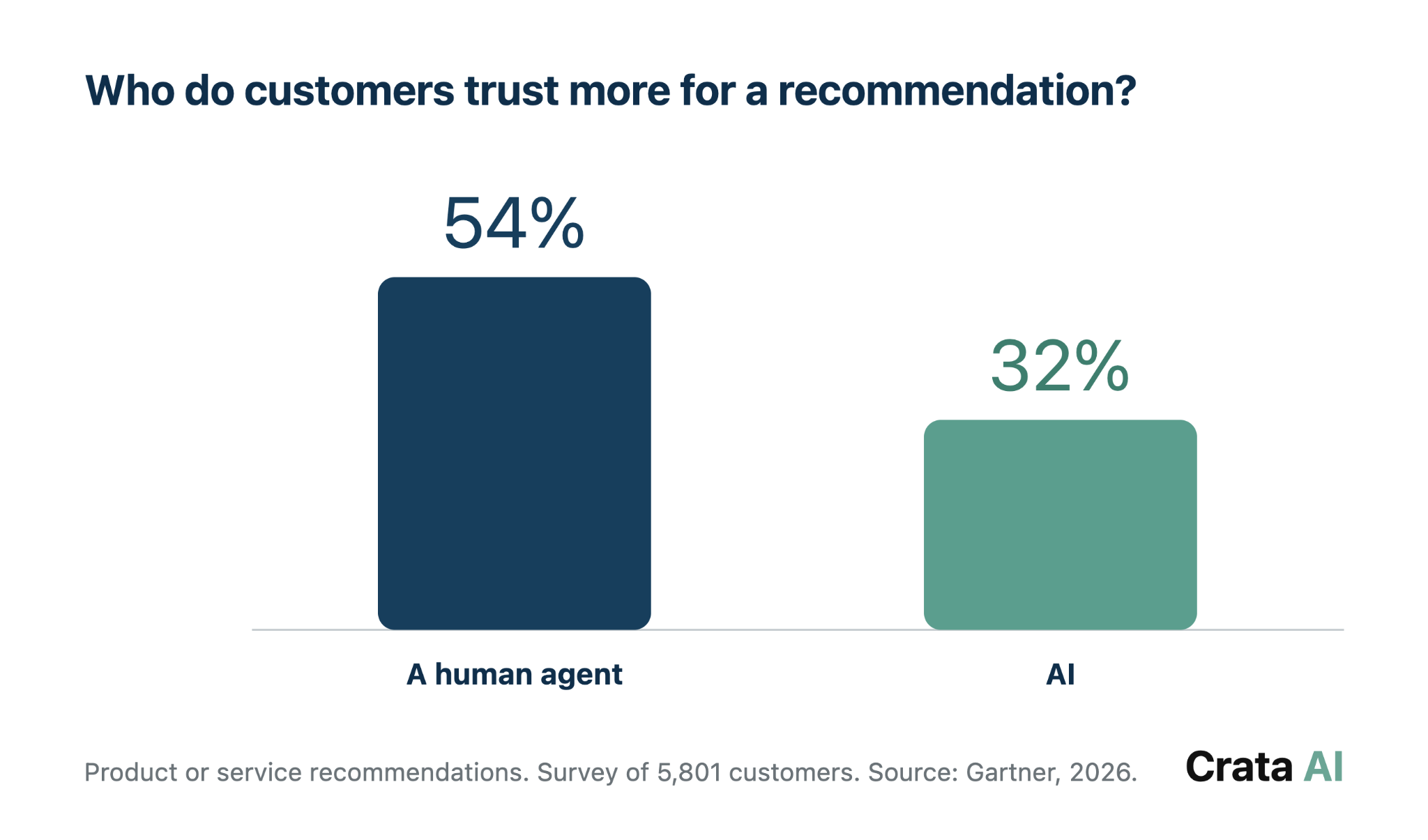
In the projects we implement, the most common mistake is starting with the chatbot because it is the part the customer sees. The bottleneck usually sits behind it, in validating a document, looking up a policy or copying data between systems.
Automating the conversation without fixing that work just moves the problem. That is why we start by measuring the full process and defining the point where a person should step in. That is how we approached it at Tecniseguros. Leobot is the conversational layer of a wider system that also validates documentation automatically, and it is that combination that does the work.
The outcome is around 70% of repetitive queries resolved without the team stepping in. The rest reaches a person with the case already assembled and the context in front of them.
Our guide to enterprise chatbots and internal knowledge explains how an assistant answers with real, up to date documentation, which is the technical foundation of customer service that does not improvise answers. The same principle applies inside the company.
After-sales is where a conversation starts to be worth more than the ticket it closes. A call can reveal a recurring fault, an objection, a renewal date or a request nobody logged properly. If that context ends up in an audio file or in the agent's private notes, the company loses it.
With transcription and analysis, every call leaves a summary in the CRM covering the reason for contact, what was agreed, the pending task and any risk signal. The team stops listening to twenty minutes of audio to understand a case. Sales and after-sales get the context without asking the customer to tell their story again.
We saw this in a project with an automotive company. After-sales calls contained useful commercial information that stayed in the recordings and never reached the CRM or the workshop.
By transcribing the calls and logging the reason for contact and the needs detected, the team could follow up by email or WhatsApp and check whether the conversation ended in a workshop appointment.
None of this works without clear rules. You have to decide which calls are analysed, who can access the transcript, how long it is kept and which categories need human review. The same system supports quality control, team training and the detection of recurring problems. Neglect the maintenance and it turns into another database nobody keeps up.
After-sales ends up being the hinge between resolving an incident and keeping a customer.
A resolved incident does not guarantee a satisfied customer. If someone calls three times about the same problem, reduces product usage or asks about cancellation terms, they are already leaving signals.
Support is where those signals appear before they turn into churn. They only matter if they reach the CRM and someone can act on them.
Personalisation carries weight precisely here. In Deloitte Digital research on personalisation archetypes, the segment with the strongest affinity for these experiences is also the one that repurchases most, with 81% reporting higher satisfaction more than half the time when the brand gets it right.
In support, personalising means recognising the customer, knowing what happened before and sparing them from repeating information the company already holds. Trying to sell on every contact produces the opposite effect.
From there, concrete actions follow. A second call about the same fault opens a follow up alert. A conversation that reveals low usage triggers onboarding support. A question about limits or features signals interest in another plan.
AI organises and prioritises those signals. The team decides whether to act and how.
The path is straightforward. The conversation arrives by voice, chat or email, AI identifies the reason and logs the summary, the CRM adds history and purchases, and the team receives a task with context.
What makes the difference is a support signal reaching the right person before it is too late. Accumulating data without that circuit changes nothing.
Our guide on customer retention and conversion with AI develops that part in more detail, from churn prediction to reactivation and next best action.
The first result is rarely handling more conversations. It is usually reducing the work around each one, from retrieving information to classifying the case, summarising what happened and updating the systems. That allows faster replies, lowers the administrative load and leaves the team more time for cases that require judgement.
To know whether the project works you have to compare before and after. The main metrics are first response time, first contact resolution, average handling time, reopened tickets and customer satisfaction. Two more are worth adding, incorrect answers and failed transfers.
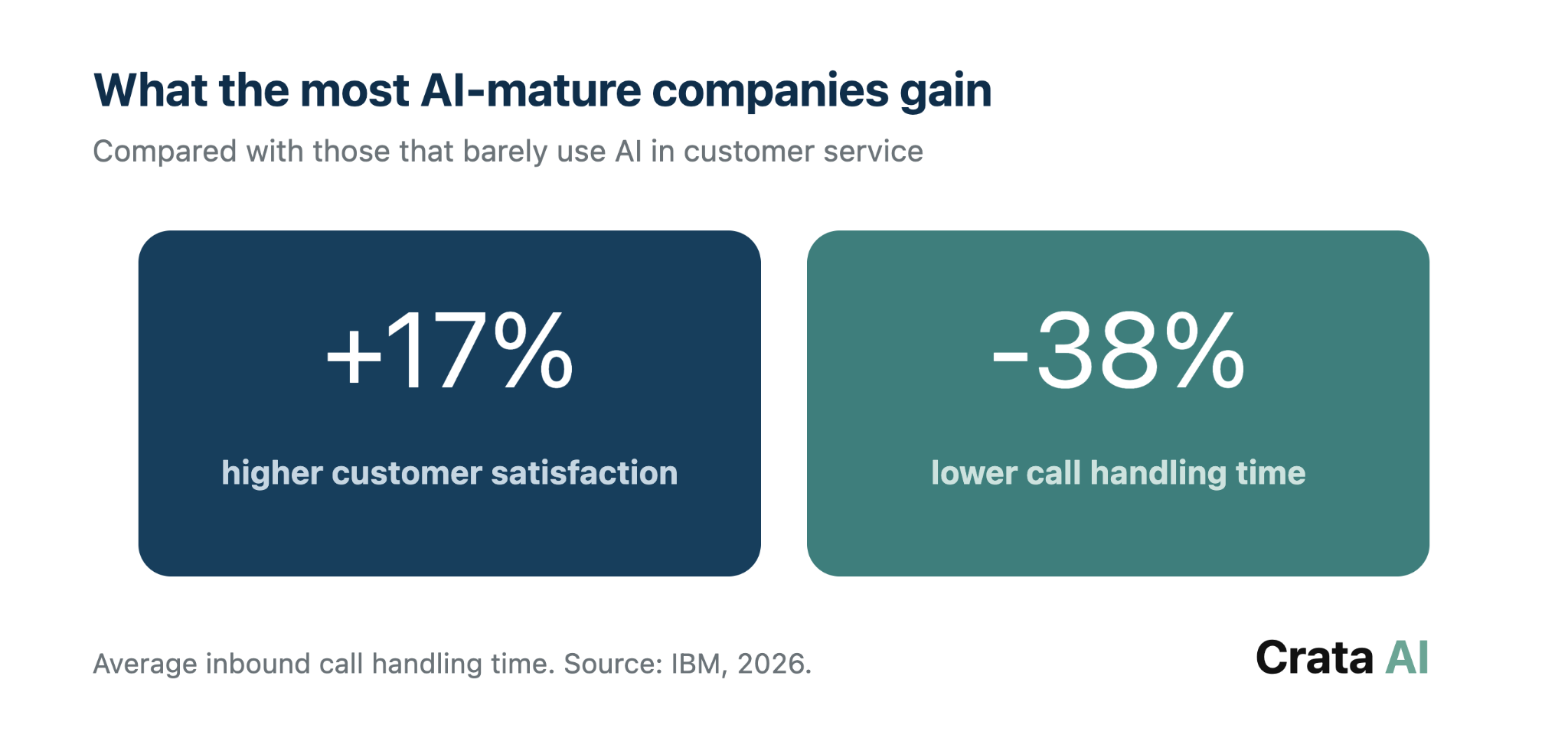
As a sector benchmark, IBM reports that organisations most mature in their use of AI for service see 17% higher customer satisfaction and 38% lower average inbound call handling time. That is not a promise that applies to every project, but it indicates where the impact should show up.
At Tecniseguros we started from Leobot, the WhatsApp virtual assistant the company already had. We redesigned its flows, connected it to the user, policy and request systems, and added open AI conversation, intent and sentiment analysis and automatic routing.
That setup now supports over 800 claims handled per month through Leobot and a 90% reduction in claim processing time.
In the projects we implement, savings start in the least visible tasks, in preparing context, retrieving data and logging the conversation. That is why we measure success by the time the team gets back and the quality of the service, rather than by the number of conversations automated.
A generic chatbot reduces a share of the simple queries. The step change comes when the solution queries authorised sources, updates systems and leaves the case ready for the team. The control test is straightforward: if reopened tickets go up or satisfaction goes down, the project is not working, however much volume it absorbs.
Starting with a chatbot for everything is usually the fastest way to stall the project. Pick one process, one customer group and one metric. It could be reducing first response time, resolving more cases on first contact or removing an administrative task that eats hours every week.
- Start where it actually hurts. Review the 3 to 5 contact reasons that generate the most volume, time or reopened tickets. If the process is neither frequent nor tied to a clear metric, proving the pilot works will be difficult.
- Assemble the minimum context. Define what the AI needs to know, which system holds that information and who is allowed to access it. Build in permissions, consent and what must be logged in the CRM from day one.
- Test with a clear boundary. Limit the intents it can resolve and set when it must transfer. The handover has to include the conversation, the data collected and the reason for escalation, so the customer does not start from scratch.
- Measure before and after. First response time, first contact resolution, CSAT, reopened tickets, cost per case and administrative hours. Add incorrect answers and failed transfers to check that the saving does not degrade the experience.
- Scale only what works. Once the first flow is stable, add another contact reason or connect its signals to after-sales and retention. Expand channels, processes and teams one at a time so you can tell which change moves the metric.
How you choose a partner matters too. Ask them to explain which systems they need to connect, how answers will be reviewed and which logs you will be able to audit. A prototype can work in a demo and fail in production if nobody has solved security, monitoring, cost or maintenance.
The Crata AI AI Quickstarter organises that work over six weeks. We prioritise use cases, check whether the data is ready and close with a roadmap covering metrics and integrations. For customer service, the concrete output is which process deserves to go first and what needs to be in place before development starts.
What makes AI in support worth it
AI in customer service is worth it when it removes repetitive work without pushing the company further from the customer. Getting there does not require automating everything.
It requires choosing one specific process, giving access to the right context and designing the handover to a person properly. From there, the same information improves after-sales, retention and conversion.
If you want to know which support process has the most room in your company, let us look at it with your data and your systems in front of us and come out with a concrete business metric.
Contact: info@crata-ai.com
Frequently asked questions about AI in customer service
What is AI in customer service?
AI in customer service interprets requests, retrieves information and completes tasks across chat, voice, email and WhatsApp. Compared with a basic chatbot, the difference is context. Integrated with the CRM and support tools, it recognises the customer, checks their history, logs the case and hands the full situation to a person when needed.
Which customer service tasks can be automated with AI?
The best candidates are frequent queries, ticket classification, data collection, call transcription, summaries and administrative tasks. AI can also draft replies for the agent. Sensitive complaints, exceptions and decisions with legal, financial or reputational impact should keep human oversight.
Does AI replace customer service agents?
AI replaces specific tasks rather than the agent's whole job. Gartner found that 85% of service leaders are expanding human agent responsibilities as AI reduces contact volume, and that only 31% have implemented or are planning frontline workforce reductions through the first quarter of 2027. People are still needed to understand exceptions, negotiate and take responsibility.
How do you measure the return on AI in customer service?
Start with a baseline and compare the pilot result. Measure first response time, first contact resolution, CSAT, reopened tickets, cost per case and administrative hours. Add two quality metrics, incorrect answers and failed transfers. Saving time loses its value if the customer ends up repeating information or opening another ticket.
How does customer service connect to retention and conversion?
Conversations reveal frustration, low usage, cancellation risk or interest in another service earlier than other channels. When AI summarises those signals and logs them in the CRM, after-sales can act with context. The goal is to stop useful information from disappearing when the conversation closes.
Gartner (2026). Gartner Survey Finds 91% of Customer Service Leaders Under Pressure to Implement AI in 2026
Gartner (2026). Gartner Survey Finds 85% of Service and Support Leaders are Expanding Human Agent Responsibilities Despite Expectations of Mass AI Layoffs
IBM (2026). AI in customer service
Deloitte Digital (2025). Personalization customer personas